


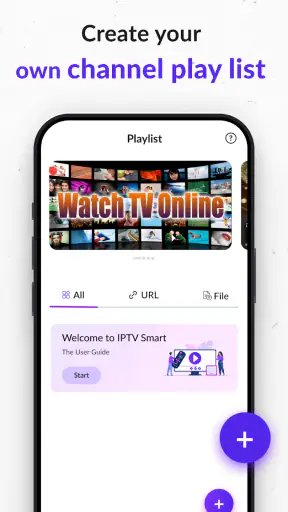
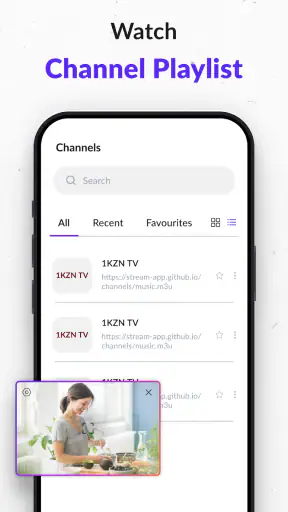
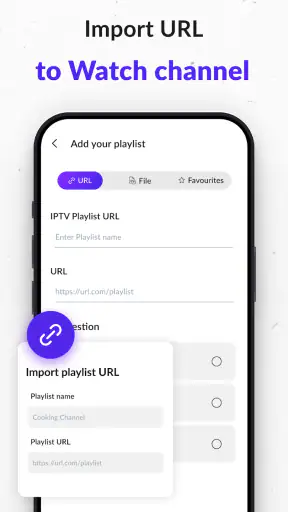
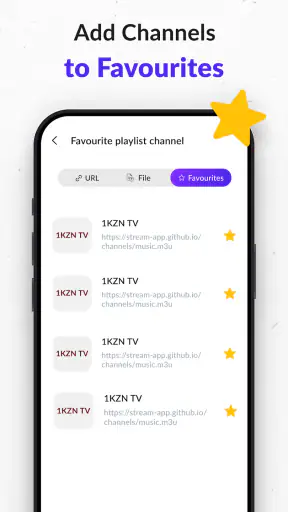
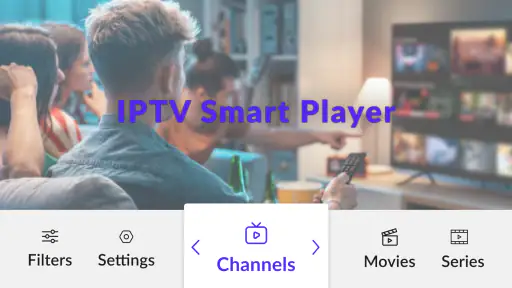
I approached IPTV Player - Smart Live TV as a practical viewing tool rather than a replacement for a full television service. Its purpose is straightforward: it lets me load my own M3U or M3U8 playlist and use an Android device as the place where those streams are played. That distinction matters. The app is not a channel provider, and its usefulness depends heavily on the quality, organization, and reliability of the playlist I bring to it.
After spending time with it, my impression is that the appeal is strongest during the first setup. Once a playlist is available, the app offers a focused way to reach live streams without forcing me into a large entertainment ecosystem. It is free, rated for Everyone, and developed by Johran Pastoon App. The current release is version 2.4, and it works with Android 7.0 or later, which makes it accessible on many older phones and tablets as well as newer devices.
What I like most is the narrow purpose. I do not have to search through unrelated recommendations or create a viewing routine around a platform’s catalog. I can use the player for the channels or streams I already have access to. What I like less is that a simple player cannot fix an unstable source, an incomplete playlist, or a stream that has changed address. In other words, the app can make playback more convenient, but it cannot make the underlying IPTV service dependable.
How the first week feels
The first week is when this app makes its best case. If I already have a working M3U or M3U8 file or playlist address, the basic idea is easy to understand: bring that source into the player, browse the available entries, and start watching. The experience feels more direct than using a general video app because the interface is centered on live playlist playback rather than on discovering content supplied by the application itself.
That directness is useful in everyday situations. I can imagine using it on a spare Android tablet in the kitchen, keeping a personal live-stream playlist available while cooking, or using an older phone as a lightweight screen for news and other channels. It can also suit someone who travels with a tablet and prefers to keep their own collection of stream addresses in one place instead of switching between several dedicated services.
The important first-week question is not simply whether the player opens a stream. It is whether the whole path from playlist to playback feels manageable. A playlist with clear names and working entries is much easier to use than one filled with vague labels, duplicates, or expired addresses. I found that the app’s practical value rises sharply when the source is already tidy. The player becomes the convenient front end, while the playlist remains the real foundation.
For a smoother start, I would prepare the playlist before blaming the app for a confusing viewing experience. Removing dead entries, grouping similar channels, and keeping a backup copy of the original file are sensible steps. A clean playlist reduces scrolling and makes it easier to tell whether a problem comes from the player or from the source. This is one of the less obvious trade-offs: the app is simple partly because it leaves more responsibility with the user.
The app’s store presence shows a 3.8 average from around 4.5 thousand ratings, with over 5 million installs. Those figures suggest that it has reached a sizeable audience, but they do not change the central reality of IPTV playback: different users can have completely different experiences because their playlists and network conditions vary. One person may find it dependable for a small personal list, while another may encounter frequent failures from a source that changes often.
What to check before settling in
During the first few sessions, I would test more than one type of entry in the playlist. A stream that opens quickly is encouraging, but it is also worth checking whether another entry behaves differently, whether switching between channels is comfortable, and whether the app remains usable when a source does not respond. This gives a more realistic picture than testing only a favorite channel.
I would also decide where the app fits into my viewing habits. It is more convincing as a focused player for a known set of streams than as a general entertainment destination. If I expect a polished guide, recommendations, catch-up viewing, recordings, or a large on-demand library, I would look toward a broader television platform instead. The narrow design is a strength for users who value control, but it can feel bare to anyone expecting an all-in-one service.
Another practical point is device choice. A phone is convenient for occasional viewing, but a tablet usually makes a long playlist easier to browse. On a larger screen, channel names and categories are less cramped, and the player feels more like a dedicated television tool. I would not choose this app solely because it runs on an older device, but support for Android 7.0 or later does make repurposing an older phone or tablet more realistic.
Whether it earns a place after the novelty
The first-week novelty fades quickly with any IPTV player. After that, the question becomes whether opening it remains easier than using the alternatives already on my device. For me, the answer depends on the stability of the playlist and how often I watch the same group of streams. If the list is reliable and my viewing is mostly live television, the app can become a useful habit because it keeps the route to those streams short.
Its recurring value comes from reducing friction, not from adding a large number of entertainment features. I can return to the same player, choose from my own sources, and avoid installing a separate app for every provider that supports a different viewing experience. That can be especially helpful for households where the preferred channels are spread across several personal playlists or where a simple Android device is being used as a secondary screen.
There is also a useful separation between content ownership and playback. The app does not need to determine what I should watch. I decide which playlist to use, and the player handles the viewing side. For users who already understand M3U and M3U8 sources, this can feel refreshingly uncomplicated. For users who do not know where their playlist comes from or how it should be maintained, the same simplicity may feel like a lack of guidance.
A practical monthly routine would be to keep one main playlist for everyday viewing and a separate backup copy outside the app. I would avoid repeatedly replacing the working list without keeping track of what changed. If a channel disappears, comparing the current list with the backup can reveal whether the issue is a changed source, an accidental edit, or a temporary outage. This small habit makes the player less frustrating over time.
I would also resist the temptation to judge the app by the number of channels displayed. A long list is not automatically better. A smaller collection of clearly named, regularly working streams is more useful than hundreds of entries that require trial and error. The player’s long-term strength is therefore tied to curation. The more carefully I maintain what it displays, the more efficient it feels.
How it compares with familiar alternatives
Compared with watching through an official broadcaster’s app, this player offers more independence from any one broadcaster’s interface, but it may offer less polish and fewer built-in conveniences. Official apps often explain their content clearly and manage the source behind the scenes. Here, I have more control over the playlist, but I also carry more responsibility when something breaks.
Compared with a full streaming service, the difference is even clearer. A subscription platform usually focuses on discovery, profiles, recommendations, and a managed catalog. This player focuses on playback from user-supplied lists. I would choose it when I already know which live streams I want and do not need a large catalog of on-demand programs. I would skip it if my main goal is to browse new shows or resume professionally organized series.
Compared with a desktop media player, the Android format is more convenient for casual viewing and portable screens. The trade-off is that phone-based navigation may be less comfortable for someone who expects advanced playback controls or a highly customized media library. The app makes more sense as a practical mobile or tablet player than as the center of a complex home media setup.
The most important comparison is with doing nothing beyond opening playlist links individually. A dedicated IPTV player gives those streams a more consistent home and avoids treating every address as a separate task. That convenience is real, but it should not be mistaken for a complete television package. The app organizes access; it does not replace the service behind the access.
The maintenance burden that appears later
Maintenance is where the long-term experience is decided. M3U and M3U8 playlists can change, and entries can stop working for reasons outside the player. When that happens, I need to identify whether the failure is isolated to one stream or affects the whole list. Testing another entry is a quick first step. If several unrelated entries fail, checking the playlist source or network connection becomes more sensible than repeatedly restarting the app.
This is a realistic source of friction for everyday users. Someone may install the player expecting it to behave like a cable box, then become annoyed when a channel no longer loads. The app is not necessarily the cause, but it is the screen through which the problem becomes visible. A good personal workflow is to keep notes about the source of each playlist and the date it was last refreshed, without assuming that every failure can be repaired inside the player.
Playlist organization also becomes more important with time. I would remove duplicates, shorten confusing labels where possible, and separate frequently watched entries from occasional ones. If the list includes many categories, a consistent naming style makes browsing faster. This is not a flashy feature, but it is the kind of maintenance that determines whether the app feels calm or cluttered after repeated use.
Another useful habit is to avoid making the player the only place where a playlist exists. Keeping a safe copy means I can restore the list if I accidentally overwrite it or need to move the setup to another Android device. It also makes comparing versions easier when a previously working entry disappears. The app is more comfortable to live with when the user treats the playlist as a separate asset rather than as disposable setup information.
Because the application is free, it is easy to try without adding a subscription to the monthly budget. That is a genuine advantage for people who already have legitimate playlist access and only need a playback tool. Still, free access should not be confused with zero effort. The ongoing cost is mainly time: checking sources, cleaning the list, and troubleshooting failures when they occur.
Questions I would answer before installing
If I were advising a friend, I would first ask whether they already have a legitimate M3U or M3U8 playlist. If the answer is no, this app alone will not provide a ready-made television lineup. Its role is to play the sources the user supplies, so it is best suited to someone who understands where their streams come from and has permission to use them.
I would also ask what device they plan to use. Android 7.0 compatibility makes older hardware a possible choice, but an older device may still struggle with demanding streams or have a less comfortable screen. The player can extend the life of a spare tablet, yet the quality of playback will still depend on the device, network, and source working together.
For a family television, I would consider who will maintain the playlist. If one person is comfortable handling broken entries and reorganizing channels, the setup can work well. If everyone expects a polished guide that updates itself, a managed television service is likely to be less frustrating. This is not a criticism of the app so much as a clear boundary around what a playlist player is designed to do.
I would also think about privacy and trust in the playlist itself. The app’s job is to open user-selected streams, so I would only use sources from providers I recognize and trust. A player cannot make an unknown source safe or legitimate. Keeping the source list selective is a sensible part of using the application responsibly.
Where fatigue starts to show
The main fatigue comes from repetition. If I must test several entries before finding one that works, the convenience of a dedicated player quickly weakens. The same is true when channel names are unclear or when a playlist contains outdated material. These problems may originate with the source, but they shape the daily impression of the app all the same.
There is also a psychological limit to manual control. At first, choosing my own playlist feels flexible. After several weeks, I may wish for the smoother routine of a managed service that handles availability, presentation, and organization for me. Users who enjoy controlling their own setup will see this as a fair exchange. Users who want everything maintained automatically may experience it as ongoing homework.
The app can also be the wrong choice for people whose viewing is mostly on-demand. If I spend more time searching for films and series than watching live streams, a conventional streaming platform is likely to serve me better. Likewise, anyone who depends on advanced television features should compare expectations carefully before committing to a player whose central job is playlist playback.
My other caution is about confusing a clean interface with reliable content. A well-presented playlist can make the setup feel professional, but it does not guarantee that every stream will remain available. I would evaluate the app over repeated sessions and different days rather than deciding after one successful playback. Long-term trust comes from consistent sources, not from the player’s appearance alone.
Even with those limitations, I do not see the maintenance as a deal-breaker for the right audience. Someone with a small, dependable playlist may spend very little time managing it. The burden becomes noticeable mainly when the list is large, frequently changing, or assembled from inconsistent sources. That distinction is important because it explains why reviews of IPTV players can vary so widely between users.
My long-term verdict
IPTV Player - Smart Live TV earns lasting space on my Android device when I treat it for what it is: a focused player for my own M3U and M3U8 playlists, not a complete television provider. Its strongest quality is the direct path from a known source to live playback. Its weakest point is that the app cannot remove the work involved in keeping those sources accurate and usable.
I would recommend it to someone who already has legitimate playlists, prefers live streams, and wants a free Android option that can also run on older supported devices. It is particularly sensible for a spare tablet, a personal channel list, or a household member who values a simple player over a large entertainment platform. The app’s 5 million-plus installs show that this basic use case has broad appeal, while the 3.8 average suggests that the experience is not equally smooth for everyone.
I would steer a friend elsewhere if they expect the app to supply channels, maintain a catalog, offer a polished electronic guide, or provide the convenience of a managed subscription service. I would also avoid making it the household’s only viewing solution if nobody wants to troubleshoot playlists. In those situations, an official broadcaster app or a full streaming platform is likely to create a more dependable routine.
After the novelty fades, the decision is simple: does the saved time from having a dedicated playlist player outweigh the occasional effort of maintaining the playlist? For a clean and stable source, I think it does. For a constantly changing or poorly organized one, the player will feel like another layer of work. My final view is positive but conditional: this is a useful tool for people who want control and already have the right sources, and a poor fit for anyone looking for an effortless all-in-one TV experience.


